Webspiritualityowner

Wolf Reflection

/reflections?tab=wolf

Wolf Reflection, from entry to detail

The Wolf Reflection is based on the Cherokee Two Wolves parable — the idea that inside each of us live two wolves: one of light (gratitude, kindness, patience, compassion) and one of shadow (anger, envy, fear, resentment). The wolf that grows is the one you feed.

This interactive tool lets you log daily choices by tapping behavior buttons for either wolf. Each choice opens a reflection modal where you describe what happened and what you learned. Over time, you build a visual balance showing which wolf you're feeding, with stats tracking across Today, Week, Month, Year, and All Time.

The tool lives within the My Reflections hub under the Wolves tab, alongside Gratitude, Feelings, Wins, Letters, and other reflection types.

Imported from Inner Quest's app-owned walkthrough library. The captures are real product evidence, but their original run manifest and detailed interaction log predate Walkthrough Studio, so freshness is not claimed.

  1. 01

    Landing Page — The Two Wolves

    Opened /reflections?tab=wolf.

    Navigate to /reflections?tab=wolf (or tap the Wolves tab in My Reflections). The page displays the iconic 'THE TWO WOLVES' heading with the subtitle 'Which one grows? The one you feed.'

    Two side-by-side panels show:

    • Light Wolf (left, blue/purple) — A serene wolf character at 100% with 8 behavior buttons: Gratitude, Kindness, Patience, Mindfulness, Compassion, Growth, Peace, Joy
    • Shadow Wolf (right, red/orange) — A fierce wolf character at 0% with 8 behavior buttons: Anger, Envy, Fear, Judgment, Resentment, Victim mentality, Criticism, Scarcity thinking

    Above the wolves, a toolbar offers History, Info, Customize, and Theme options. Tap any behavior button to log a feeding.

    /reflections?tab=wolf
    /reflections?tab=wolf
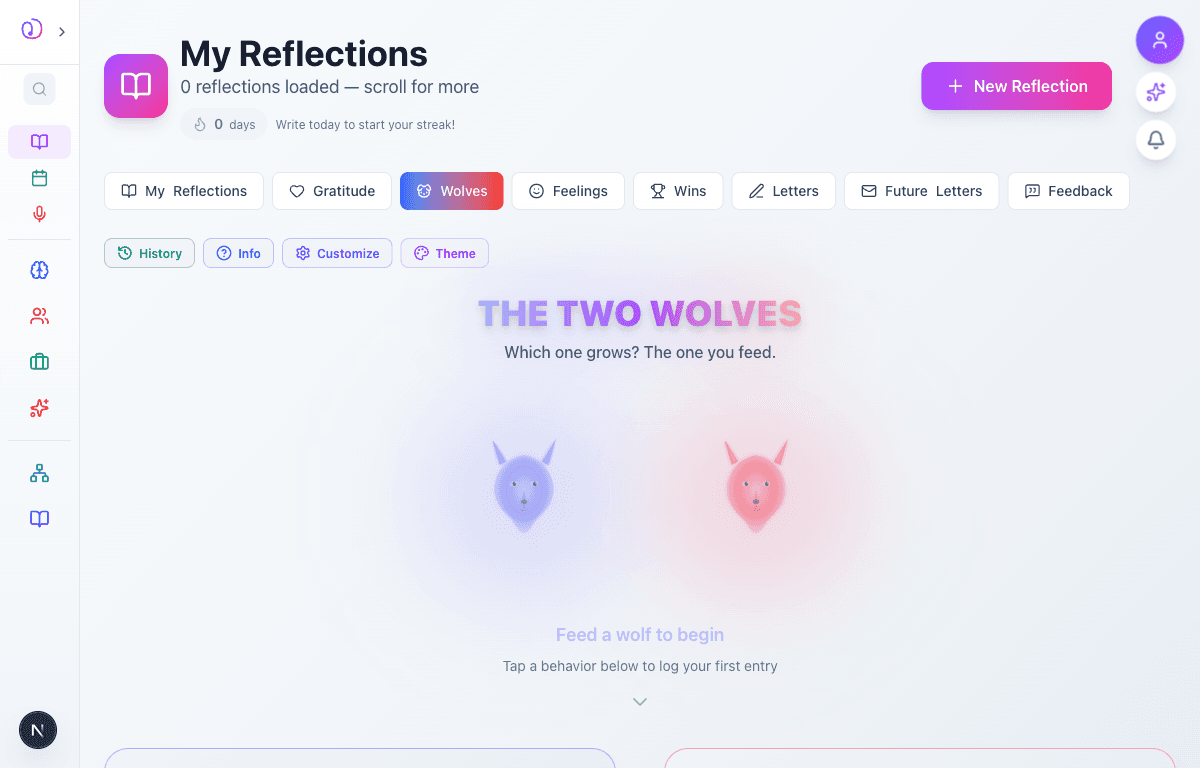
    Wolf Reflection landing page showing THE TWO WOLVES heading, light wolf (blue, 100%) with positive behavior buttons and shadow wolf (red, 0%) with negative behavior buttons
  2. 02

    Feeding a Wolf — Reflection Modal

    Advanced to the next state preserved by the app-owned walkthrough.

    Tapping a behavior button (e.g., 'Gratitude' on the light wolf) opens a reflection modal. The modal shows which wolf and behavior you're feeding, and asks you to reflect on the moment:

    • What happened?
    • What triggered this choice?
    • What did you learn?

    A text area lets you write your reflection. The modal includes a 'Save reflection' button to record your entry.

    /reflections?tab=wolf
    /reflections?tab=wolf

    Reflection modal after tapping Gratitude on the light wolf, showing text area for writing a reflection about the choice
  3. 03

    Writing Your Reflection

    Advanced to the next state preserved by the app-owned walkthrough.

    Type your reflection in the text area. This is your private space to process the moment — describe what happened, why you made this choice, and what insight you gained.

    For example: 'Today I chose to appreciate the small wins — a good conversation with a colleague, finishing a task I'd been putting off, and the sunset on my walk home.'

    Tap 'Save reflection' when you're ready to log the entry.

    /reflections?tab=wolf
    /reflections?tab=wolf

    Reflection modal with text filled in describing a gratitude moment, with Save reflection button ready to submit
  4. 04

    Wolf Balance View

    Advanced to the next state preserved by the app-owned walkthrough.

    After logging entries, the main view updates to show your wolf balance. The light and shadow wolves are sized proportionally to how much you've fed each one:

    • 100% LIGHT / 0% SHADOW means all your logged behaviors have been positive
    • The wolf characters animate to reflect the balance — the fed wolf grows larger
    • Each behavior button is a clickable bubble arranged around a central LIGHT or SHADOW label

    The balance is a powerful visual reminder of your daily choices and patterns.

    /reflections?tab=wolf
    /reflections?tab=wolf
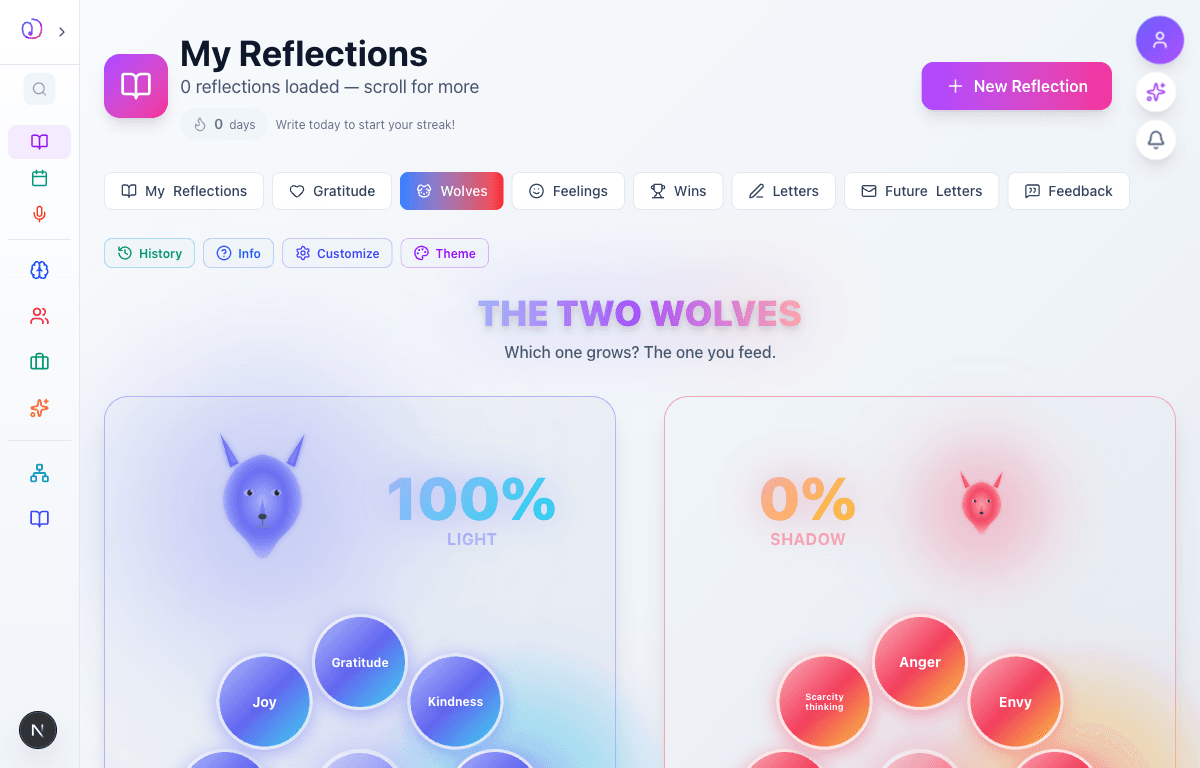
    Wolf balance view showing 100% LIGHT wolf (large, blue) with positive behavior bubbles and 0% SHADOW wolf (small, red) with negative behavior bubbles
  5. 05

    Stats & Time Filters

    Advanced to the next state preserved by the app-owned walkthrough.

    Below the wolf panels, a stats bar shows your feeding history with time filters:

    • Today / Week / Month / Year / All Time — toggle to see your balance across different periods
    • Light: N — total light wolf feedings (left side, purple)
    • Shadow: N — total shadow wolf feedings (right side, red)
    • Percentage bar — visual split showing 100% / 0% (or whatever your current ratio is)

    This helps you spot trends: Are you feeding the light wolf more on weekdays? Does the shadow wolf spike during stressful months? The data tells the story of your inner journey.

    /reflections?tab=wolf
    /reflections?tab=wolf
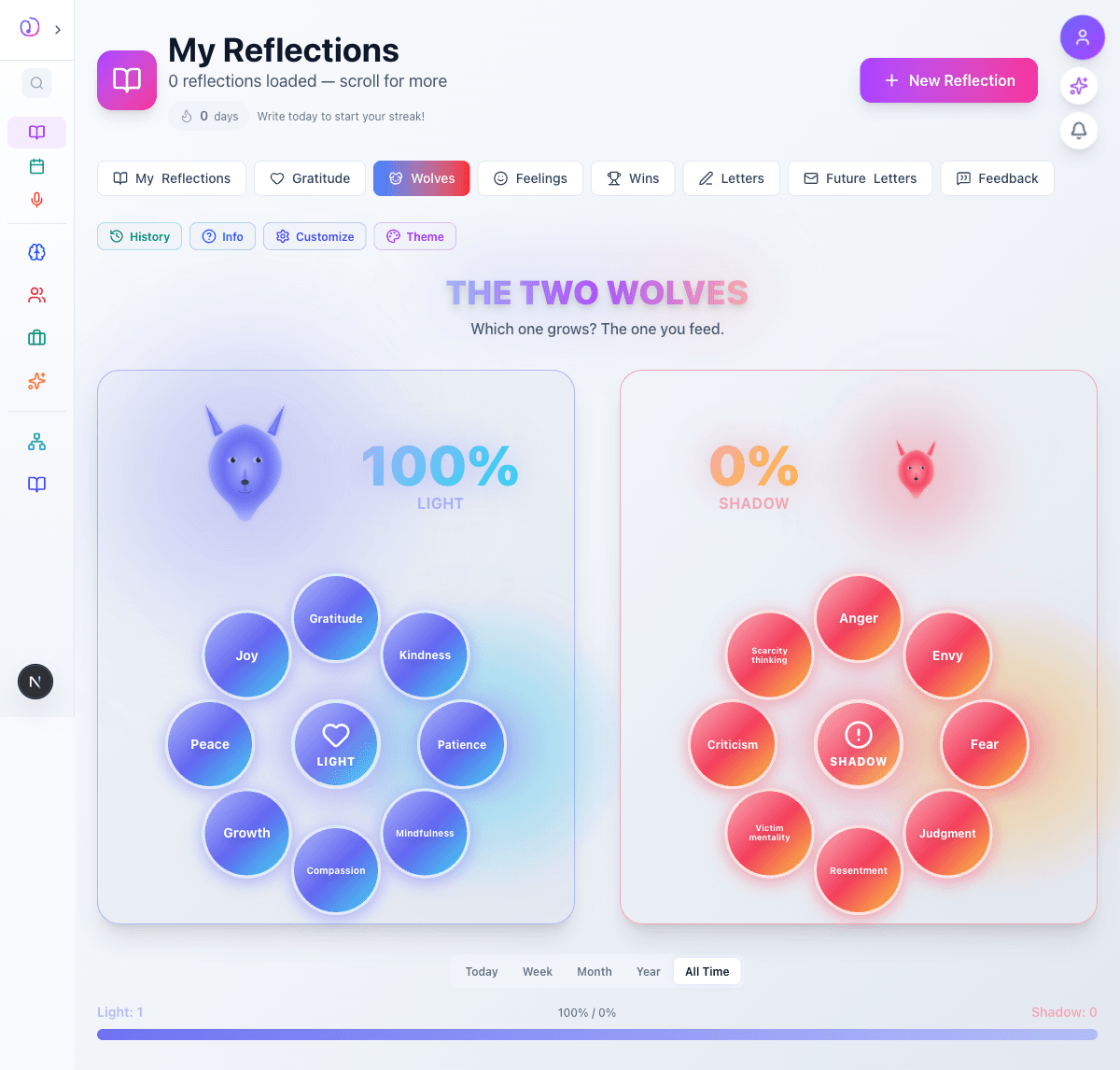
    Full page view showing both wolves, behavior buttons, time filter tabs (Today, Week, Month, Year, All Time), and stats bar with Light: 1, 100%/0%, Shadow: 0

What this feature does

  • Two wolves metaphor with 8 light and 8 shadow behavior categories
  • Reflection modal for each feeding — capture what happened and what you learned
  • Real-time balance visualization with proportional wolf sizing
  • Time-based filtering: Today, Week, Month, Year, and All Time views
  • Stats bar tracking total light vs shadow feedings with percentage split
  • History view to review past reflections and patterns
  • Customizable wolf themes and appearance
  • Integration with the Reflections hub alongside Gratitude, Feelings, and more
  • Achievement system — earn badges for consistent positive feeding
  • Wolf Balance widget on the home page dashboard

Worth knowing

  • Log in the moment — the freshest reflections are the most insightful
  • Don't avoid feeding the shadow wolf — acknowledging negative patterns is the first step to changing them
  • Use the Week view to spot patterns in your daily choices
  • Pair wolf reflections with Gratitude entries for a complete picture of your mindset
  • The goal isn't 100% light — it's awareness of which wolf you're feeding and why
  • Revisit your reflections weekly to notice growth and recurring themes
  • The shadow wolf behaviors aren't 'bad' — they're signals worth examining