Webgrowthowner

Values Wheel

/values-wheel

Values Wheel, from entry to detail

The Values Wheel helps you discover, rate, and track your core values over time. You define up to 8 values that matter most to you — like Family, Health, Career Growth, Creativity — then rate each on a 0-10 alignment scale reflecting how well you're currently living that value.

The result is a beautiful color-coded radar wheel that instantly reveals where you're thriving and where gaps exist. Each value can have reflection notes and action tasks attached, turning abstract ideals into concrete commitments.

Additional features include AI-powered value discovery, AI check-in suggestions based on your activity, a relationship comparison module (invite contacts to compare values), and a reflection prompt to deepen your understanding. You can create multiple wheels over time to track how your priorities shift.

Imported from Inner Quest's app-owned walkthrough library. The captures are real product evidence, but their original run manifest and detailed interaction log predate Walkthrough Studio, so freshness is not claimed.

  1. 01

    Landing Page — Your Values Wheel

    Opened /values-wheel.

    Navigate to /values-wheel to see the Values Wheel page. The page displays:

    • VALUES WHEEL heading with 'Discover and align with what matters most to you'
    • My Values dropdown (for managing multiple wheels) showing the count (e.g., 7/8)
    • An AI check-in banner: 'Time for a values check-in? Let AI review your recent activity and suggest score adjustments'
    • Stats dashboard: Avg Score, Balance indicator, top value with score, Gaps Found
    • Values list on the left with color-coded dots and scores
    • Wheel visualization on the right with colored segments for each value
    • Discover Values button for AI-guided discovery
    • Add a New Value expandable section for manual entry

    You can add values manually or let AI help you discover them through guided reflection.

    /values-wheel
    /values-wheel
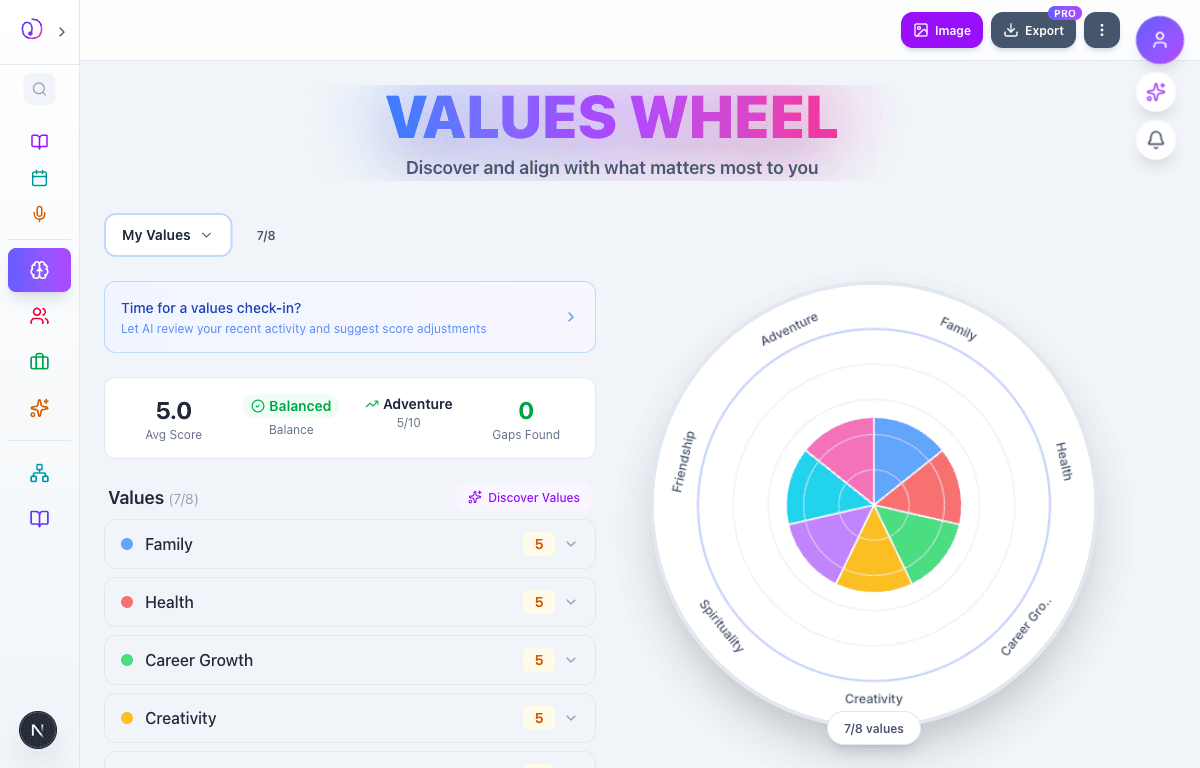
    Values Wheel landing page showing 7 values listed with the colorful wheel visualization on the right, stats dashboard showing 5.0 average score and Balanced indicator
  2. 02

    Adding Values & The Wheel Takes Shape

    Advanced to the next state preserved by the app-owned walkthrough.

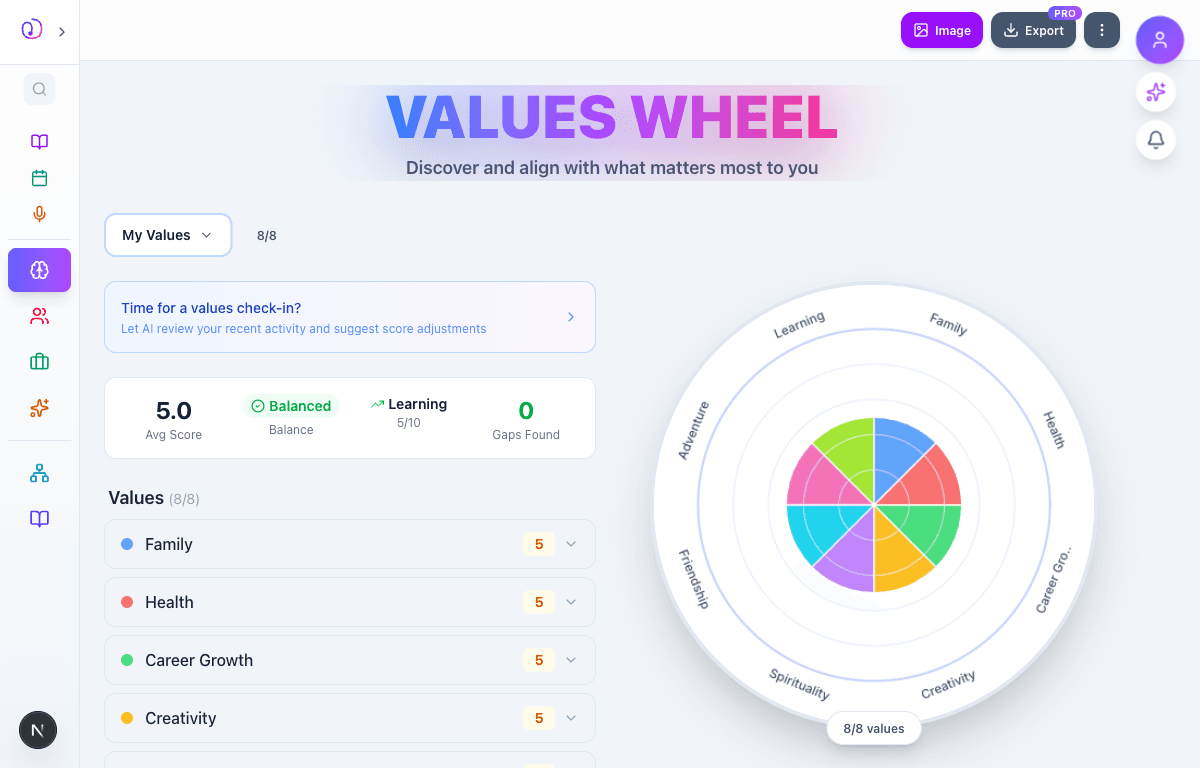
    As you add values (type a name and tap Add or press Enter), each one appears in the values list with a color-coded dot, a default score of 5/10, and an expand arrow. The wheel on the right fills in with colored segments — one per value.

    With all 8 values added, you get a full wheel plus a stats header showing:

    • Avg Score — your overall alignment (e.g., 5.0)
    • Balance indicator — how evenly distributed your scores are
    • Top/Bottom Value — which value is scoring highest or lowest
    • Gaps Found — values significantly below your average

    The wheel shows all 8 labeled segments (Family, Health, Career Growth, Creativity, Spirituality, Friendship, Adventure, Learning) in distinct colors.

    /values-wheel
    /values-wheel
    Values Wheel with 8 values added, all at score 5, with colorful wheel segments on the right showing Learning, Family, Health, Career Growth, Creativity, Spirituality, Friendship, Adventure
  3. 03

    Scoring & Reflecting on Each Value

    Advanced to the next state preserved by the app-owned walkthrough.

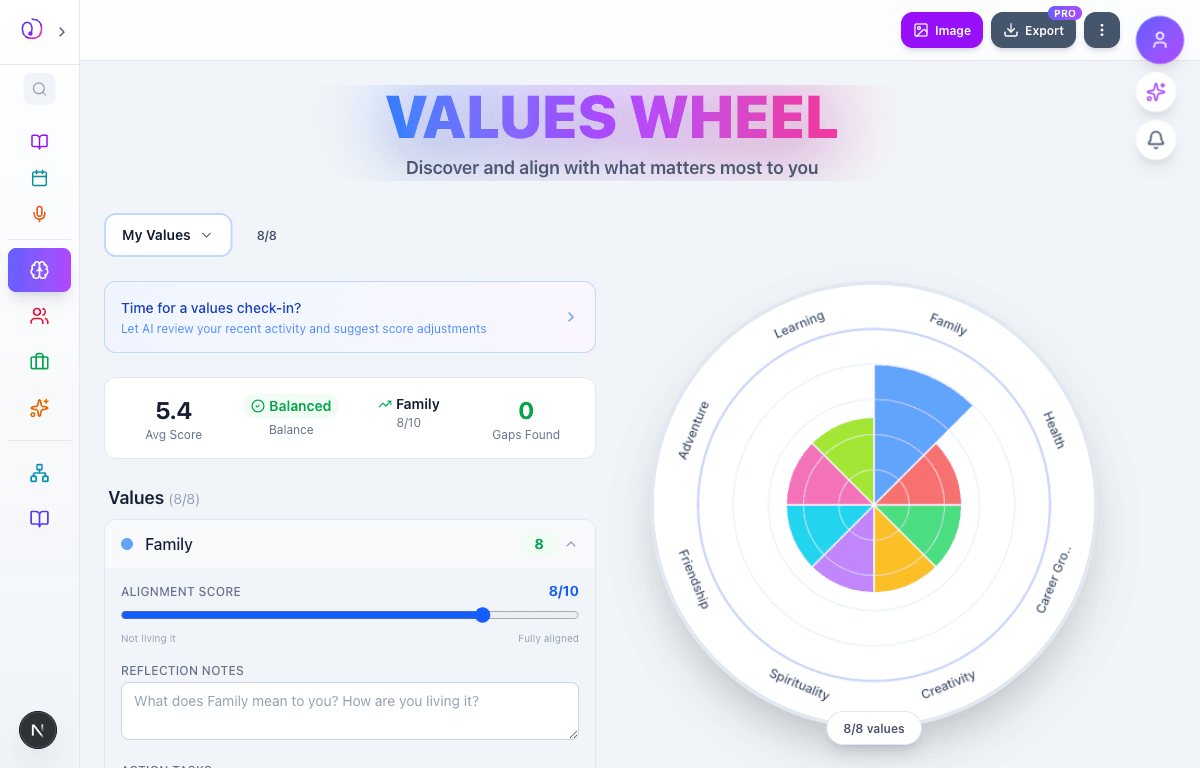
    Tap any value row to expand its detail panel. For each value you can:

    • Alignment Score (0-10 slider) — drag from 'Not living it' to 'Fully aligned'. The wheel segment grows or shrinks in real time as you adjust
    • Reflection Notes — write what this value means to you and how you're living it
    • Action Tasks — add concrete next steps to better honor this value
    • Remove — delete the value if it no longer resonates

    As you adjust scores, the stats header updates instantly: average score, balance indicator, and gap detection all recalculate. The wheel visualization reflects the new proportions immediately. In the screenshot, Family is set to 8/10 and its segment on the wheel is visibly larger than the others.

    /values-wheel
    /values-wheel
    Family value expanded showing alignment slider at 8/10, Reflection Notes text area, and Action Tasks input. Wheel on right shows Family segment grown larger than others. Stats show Avg Score 5.4
  4. 04

    Relationships & Reflection

    Advanced to the next state preserved by the app-owned walkthrough.

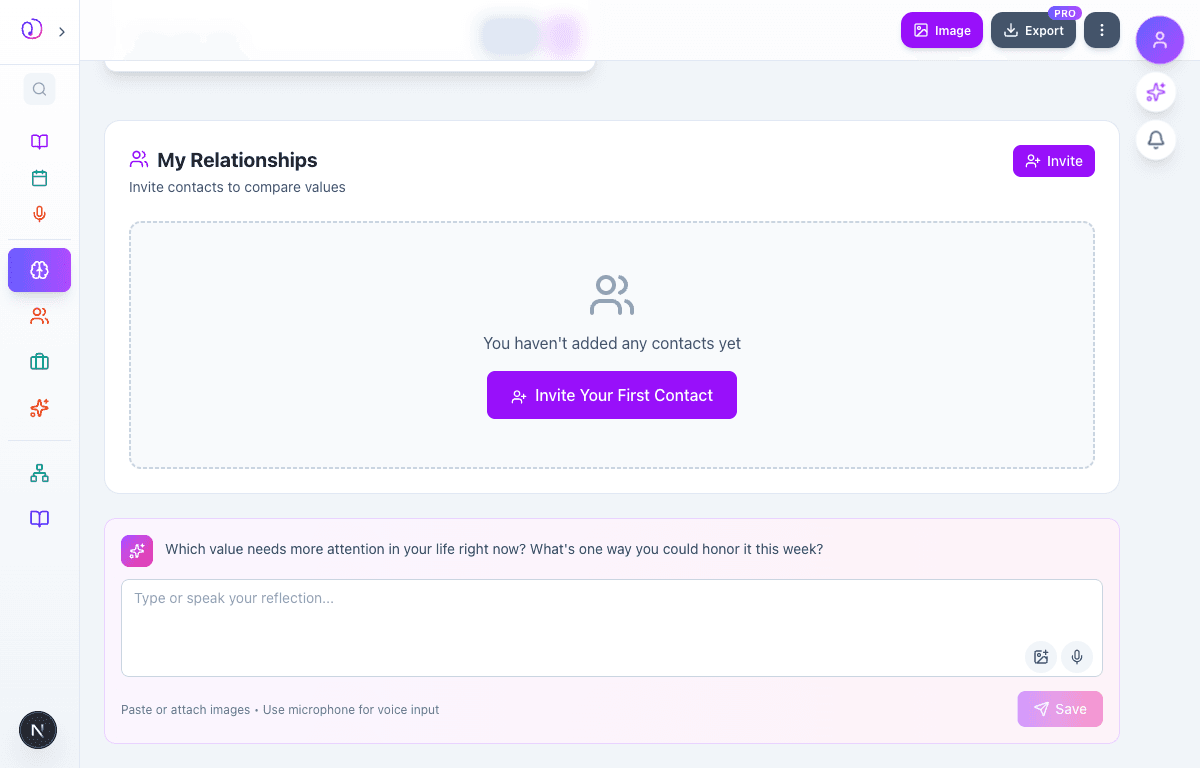
    Below the values list and wheel, additional sections provide deeper engagement:

    • My Relationships — invite contacts to create their own Values Wheel and compare alignment. See where your values overlap or diverge with people who matter to you. Shows 'Invite Your First Contact' for new users
    • Reflection Prompt — an AI-generated question like 'Which value needs more attention in your life right now? What's one way you could honor it this week?' with a text area for journaling. Supports voice input (microphone) and image attachments
    • Image & Export buttons at the top let you download the wheel as an image or export your data (PRO)

    The Values Wheel is designed to be revisited regularly — create new wheels over time to track how your priorities evolve.

    /values-wheel
    /values-wheel
    Bottom of page showing My Relationships section with Invite button and empty state, and AI reflection prompt asking which value needs more attention with text area, image attach, and microphone buttons

What this feature does

  • Rate up to 8 core values on a 0-10 alignment scale
  • Beautiful color-coded radar wheel visualization that updates in real time
  • AI-powered value discovery through guided reflection
  • AI check-in suggestions based on your recent activity
  • Reflection notes and action tasks for each value
  • Stats dashboard: average score, balance indicator, gap detection
  • Relationship comparison — invite contacts to compare values alignment
  • Multiple wheels over time to track priority shifts
  • Image download and data export
  • Voice input and image attachments for reflections

Worth knowing

  • Be honest with your scores — this tool works best when you rate how you're actually living, not how you wish you were
  • Aim for variety — pick values from different life areas (personal, professional, spiritual, social)
  • Use the Action Tasks field to turn low scores into concrete next steps
  • Revisit your wheel monthly to see how your alignment shifts
  • A 'gap' isn't bad — it highlights where your attention is needed most
  • Try the AI Discover feature if you're unsure what your core values are
  • Invite a partner or close friend to compare values — it sparks great conversations
  • The goal isn't all 10s — it's awareness of where you invest your energy