Webwellbeingowner

Nutrition Tracker

/nutrition-tracker

Nutrition Tracker, from entry to detail

Track meals with full symptom monitoring (bloating, gas, discomfort, energy), fasting windows, and symptom onset timing. Run structured elimination protocols to systematically identify food triggers through Reset, Reintroduction, and Maintenance phases.

Imported from Inner Quest's app-owned walkthrough library. The captures are real product evidence, but their original run manifest and detailed interaction log predate Walkthrough Studio, so freshness is not claimed.

  1. 01

    Landing Page — Empty State

    Opened /nutrition-tracker.

    The Nutrition Tracker opens on the Meal Log tab with an empty meal history. The header shows a green utensils icon with the tagline 'Track meals, symptoms & discover your food triggers'. Two tabs are available: Meal Log and Elimination Protocol.

    /nutrition-tracker
    /nutrition-tracker
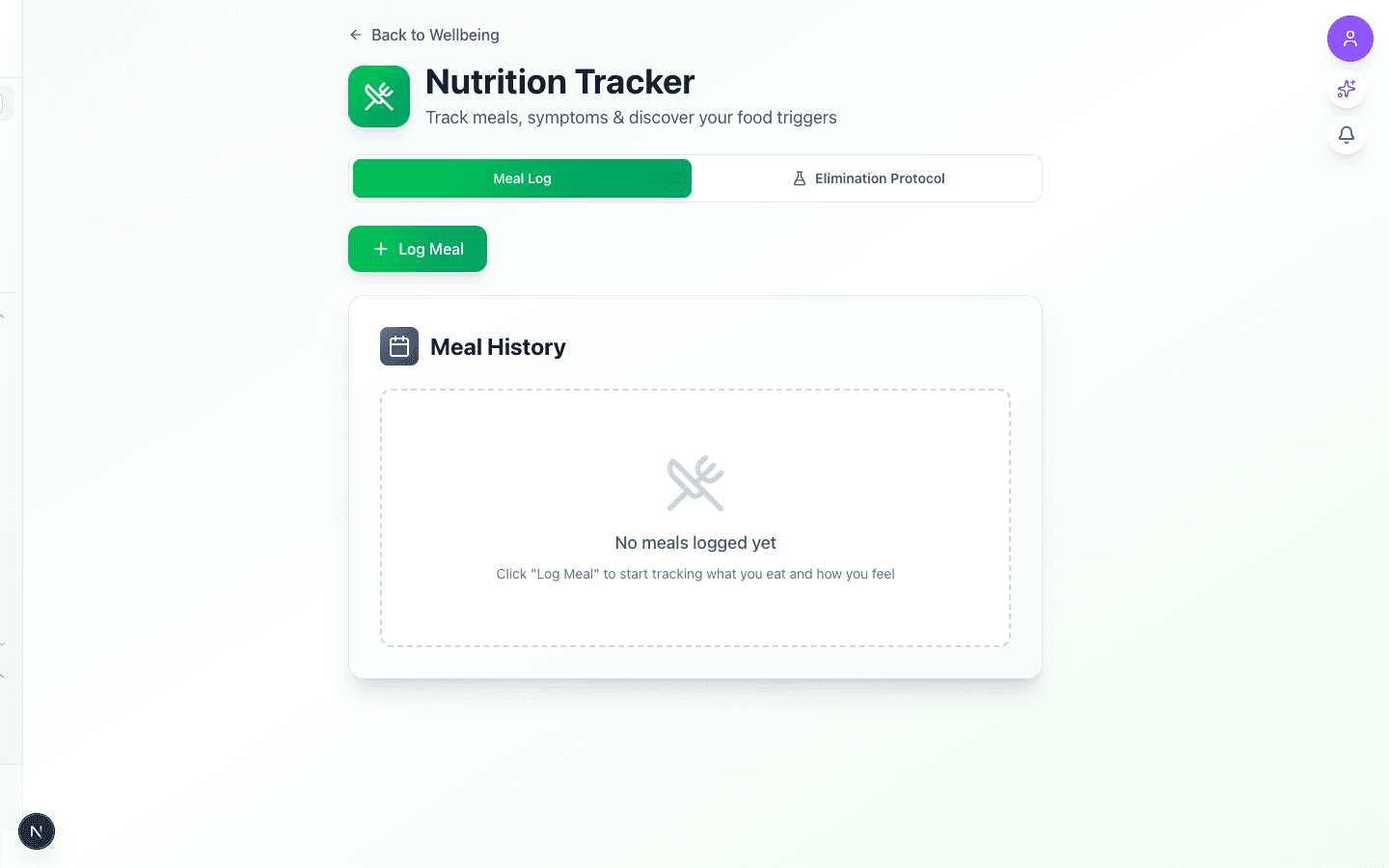
    Nutrition Tracker landing page with empty meal history and Log Meal button
  2. 02

    Log Meal Dialog — Empty Form

    Advanced to the next state preserved by the app-owned walkthrough.

    Clicking 'Log Meal' opens a dialog with date/time fields, meal type buttons (Breakfast, Lunch, Dinner, Snack), a text field for what you ate, and symptom sliders for Bloating, Gas, Discomfort (0-10 None→Severe) and Energy (0-10 Crashed→Great). Additional fields for symptom onset timing and fasting hours.

    /nutrition-tracker
    /nutrition-tracker
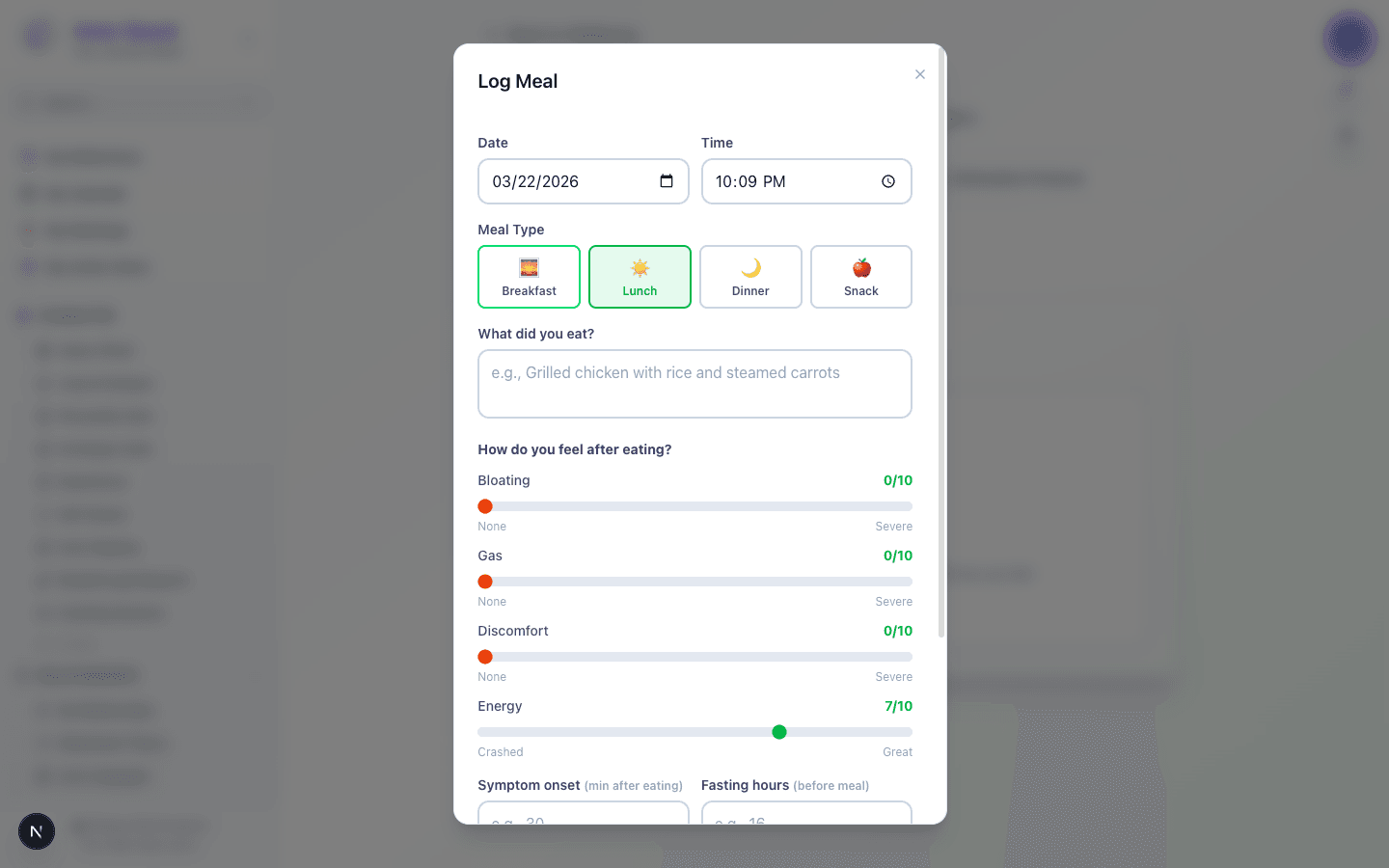
    Log Meal dialog showing empty form with meal type buttons and symptom sliders
  3. 03

    Log Meal Dialog — Filled Form

    Advanced to the next state preserved by the app-owned walkthrough.

    A sample dinner entry filled out: 'Grilled salmon with white rice, steamed carrots and zucchini, olive oil dressing'. Symptoms rated: Bloating 3/10, Gas 2/10, Discomfort 1/10, Energy 8/10. Symptom onset at 30 minutes, 16 hours fasted before the meal.

    /nutrition-tracker
    /nutrition-tracker
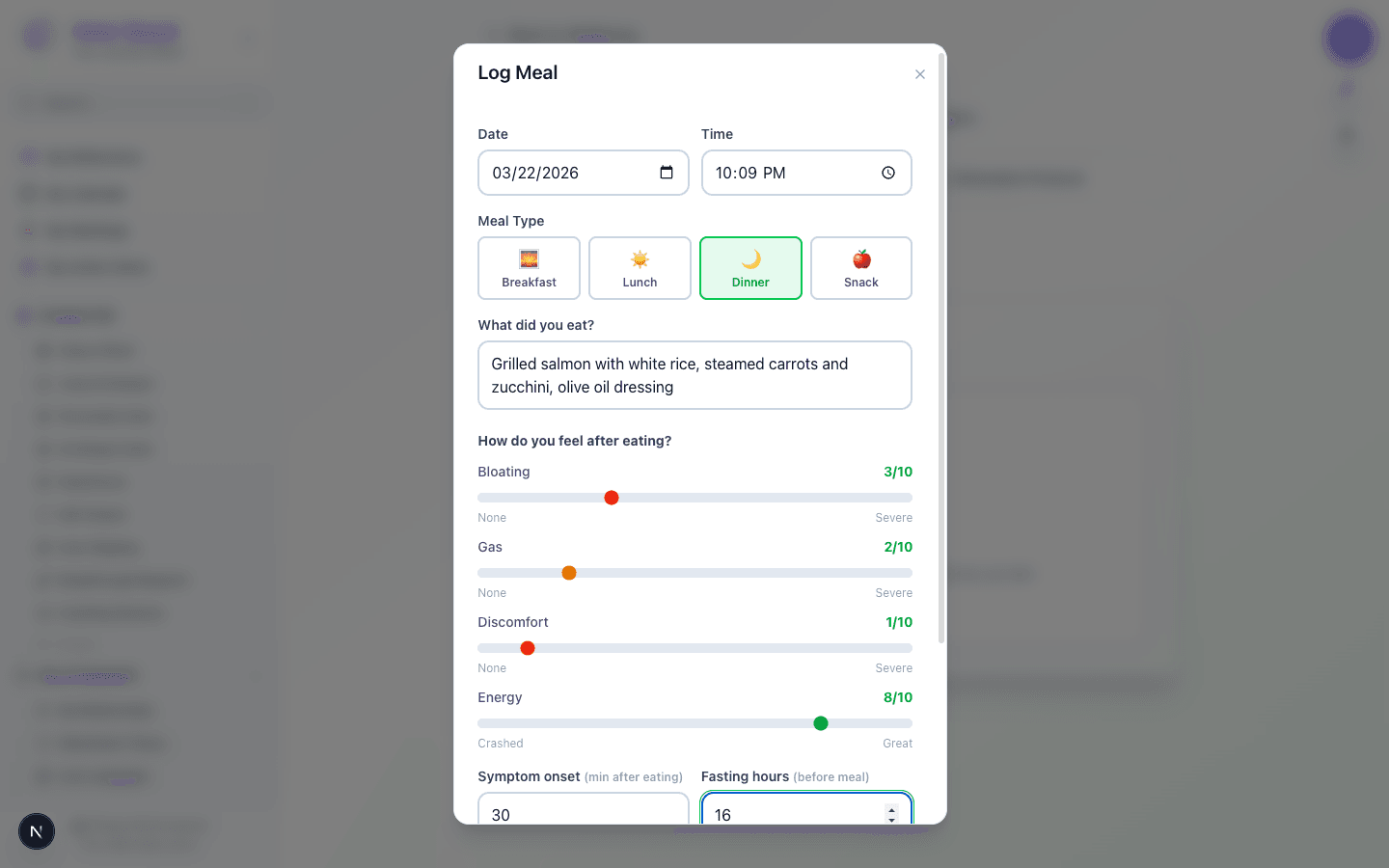
    Log Meal form filled with dinner details and symptom ratings
  4. 04

    Weekly Stats Dashboard

    Advanced to the next state preserved by the app-owned walkthrough.

    After saving a meal, the weekly stats section appears showing 4 stat cards (Meals Logged: 1, Avg Bloating: 3/10, Avg Energy: 8/10, Avg Fasting: 16h), color-coded symptom bars for Bloating/Gas/Discomfort, and AI-generated insights suggesting logging patterns and noting the intermittent fasting habit.

    /nutrition-tracker
    /nutrition-tracker
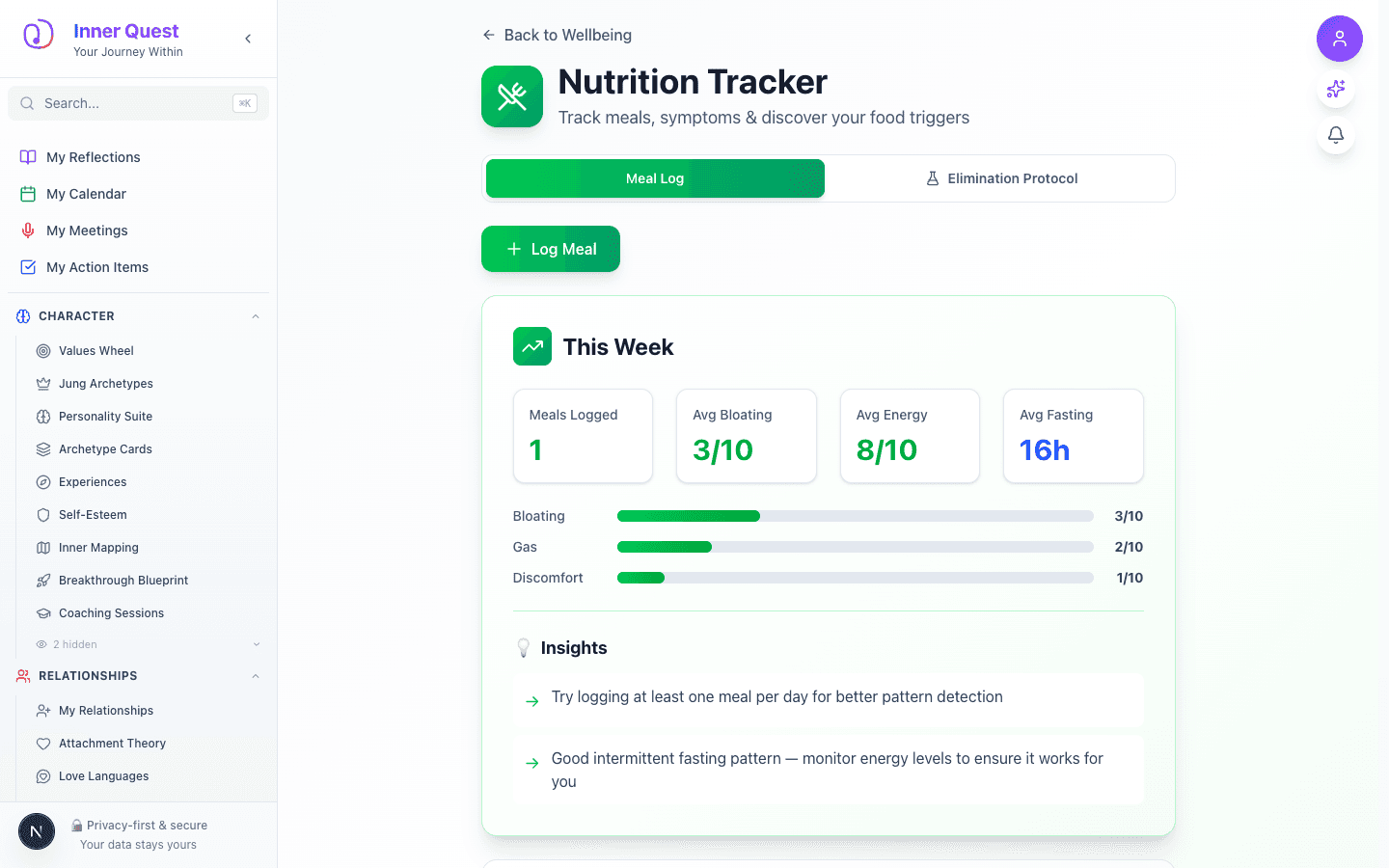
    Weekly stats dashboard with stat cards, symptom bars, and AI insights
  5. 05

    Meal History Entry

    Advanced to the next state preserved by the app-owned walkthrough.

    Scrolling down reveals the Meal History section with the saved dinner entry. Each entry shows the meal emoji, type, timestamp, food description, and colored badges for all symptom ratings plus fasting hours and symptom onset timing.

    /nutrition-tracker
    /nutrition-tracker
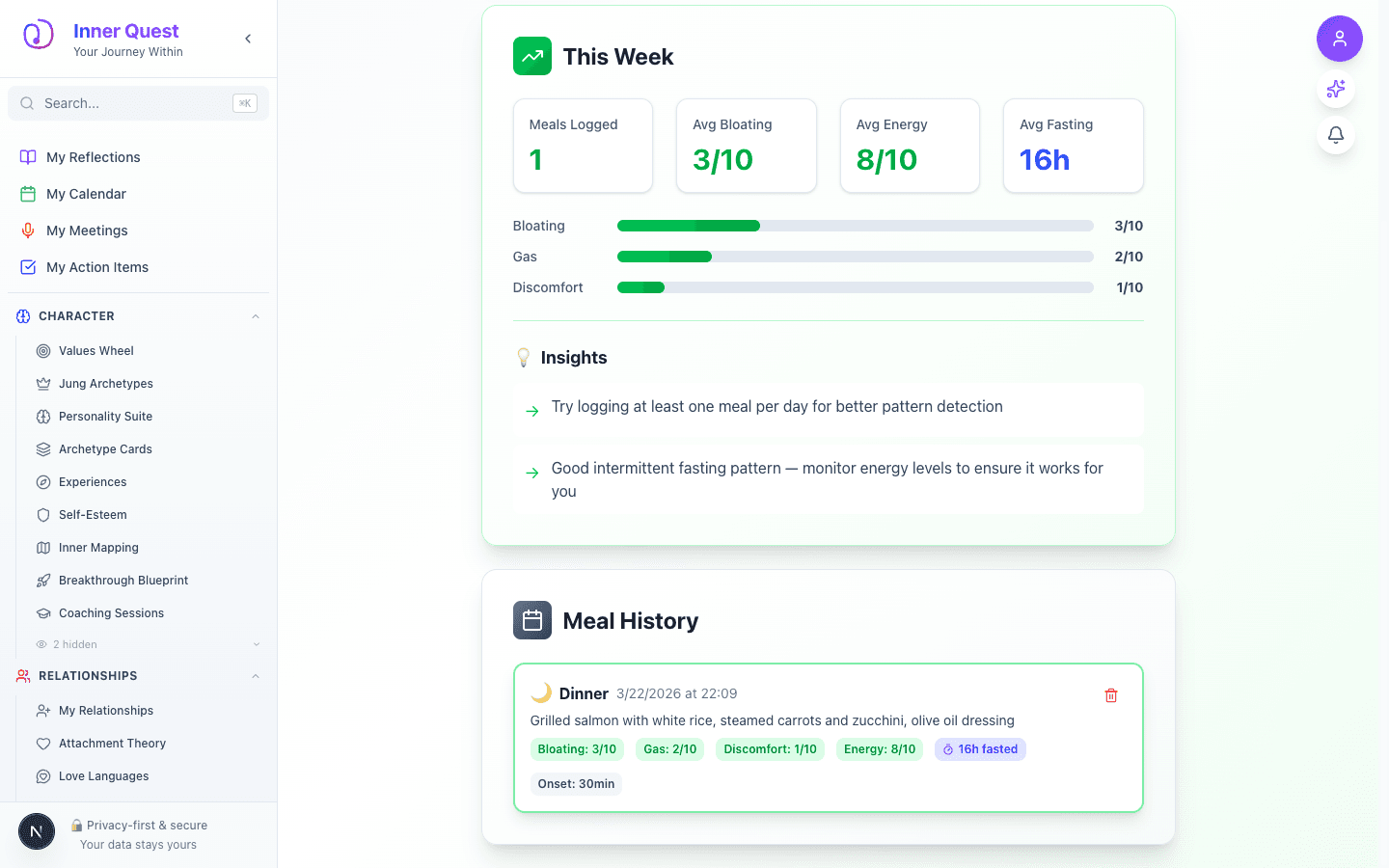
    Meal History showing a dinner entry with symptom badges and fasting indicator
  6. 06

    Elimination Protocol — Overview

    Advanced to the next state preserved by the app-owned walkthrough.

    The Elimination Protocol tab shows an overview of the 3-phase approach: Phase 1 Reset (3-5 days of safe foods), Phase 2 Reintroduction (test one food category at a time), and Phase 3 Maintenance (personalized food map). A prominent 'Start Elimination Protocol' button begins the journey.

    /nutrition-tracker
    /nutrition-tracker
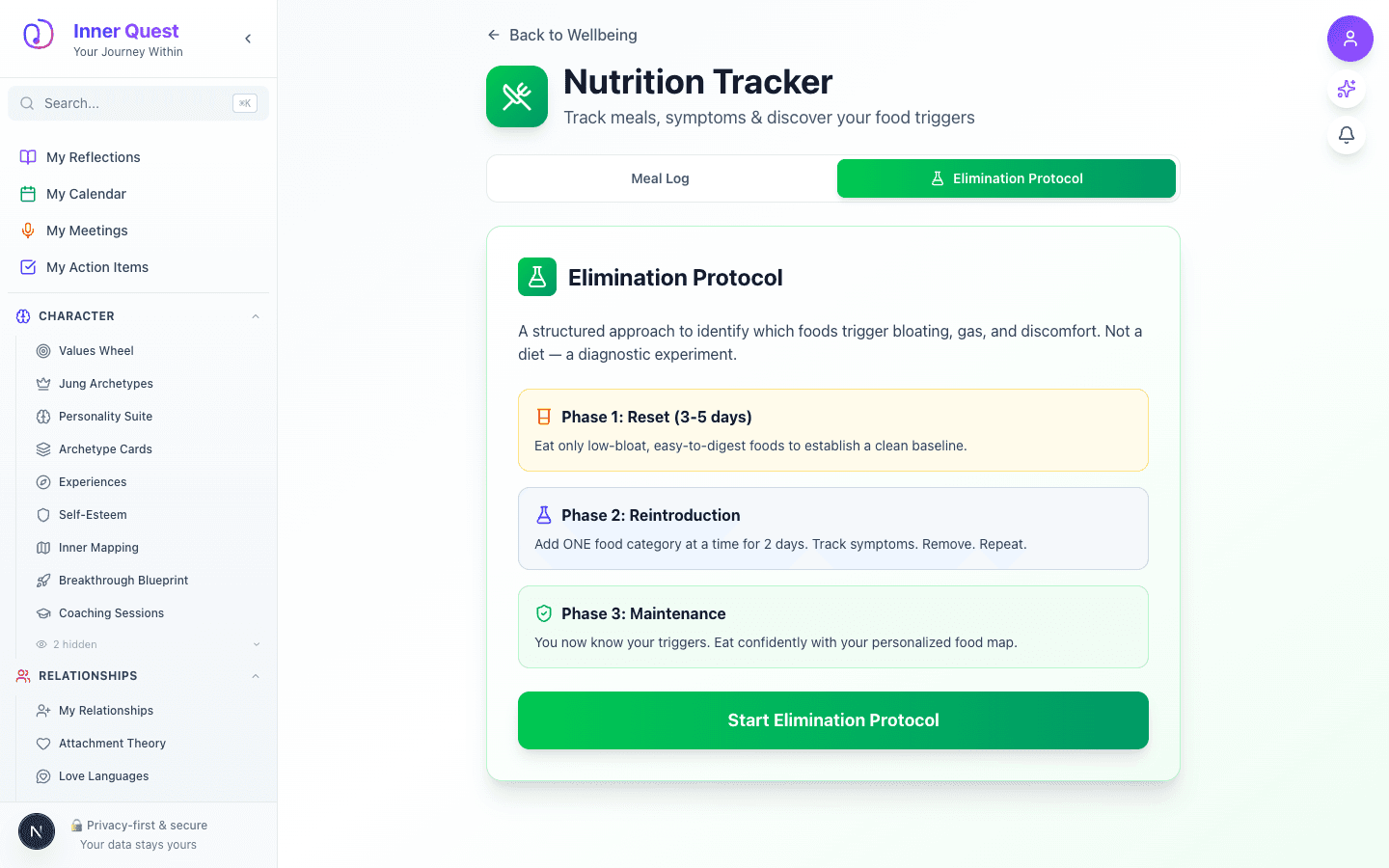
    Elimination Protocol overview with 3 phases explained and Start button
  7. 07

    Reset Phase — Safe & Avoid Lists

    Advanced to the next state preserved by the app-owned walkthrough.

    After starting the protocol, the Reset phase displays a progress bar, current phase indicator, and two side-by-side lists: Safe Foods (grilled chicken/fish, white rice, eggs, zucchini, carrots, spinach, olive oil, salt & pepper, water & herbal tea) and Avoid Completely (dairy, coffee, gluten, beans, onions & garlic, artificial sweeteners, carbonated drinks, alcohol, processed foods).

    /nutrition-tracker
    /nutrition-tracker
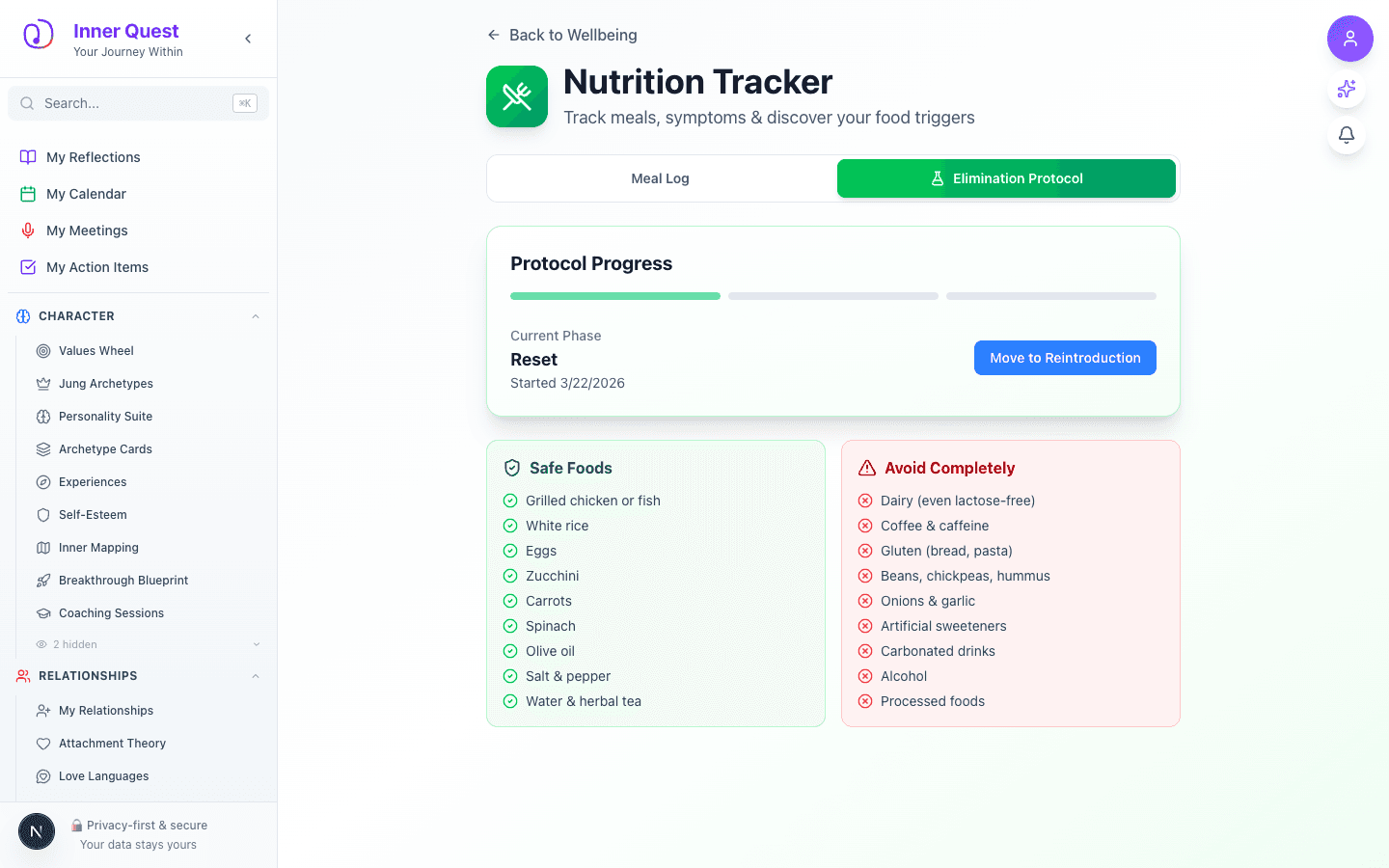
    Reset phase showing Safe Foods checklist and Avoid Completely list side by side
  8. 08

    Reintroduction Phase — Food Categories

    Advanced to the next state preserved by the app-owned walkthrough.

    The Reintroduction phase shows 12 food category cards in a 2-column grid. Each card has an emoji, category name, description, and three verdict buttons: Safe, Maybe, and Trigger. Categories include Coffee/Caffeine, Dairy, Gluten, High-FODMAP, Raw Vegetables, Sugar/Sweeteners, Alcohol, Processed Food, Eggs, Nuts/Seeds, Soy, and Nightshades.

    /nutrition-tracker
    /nutrition-tracker
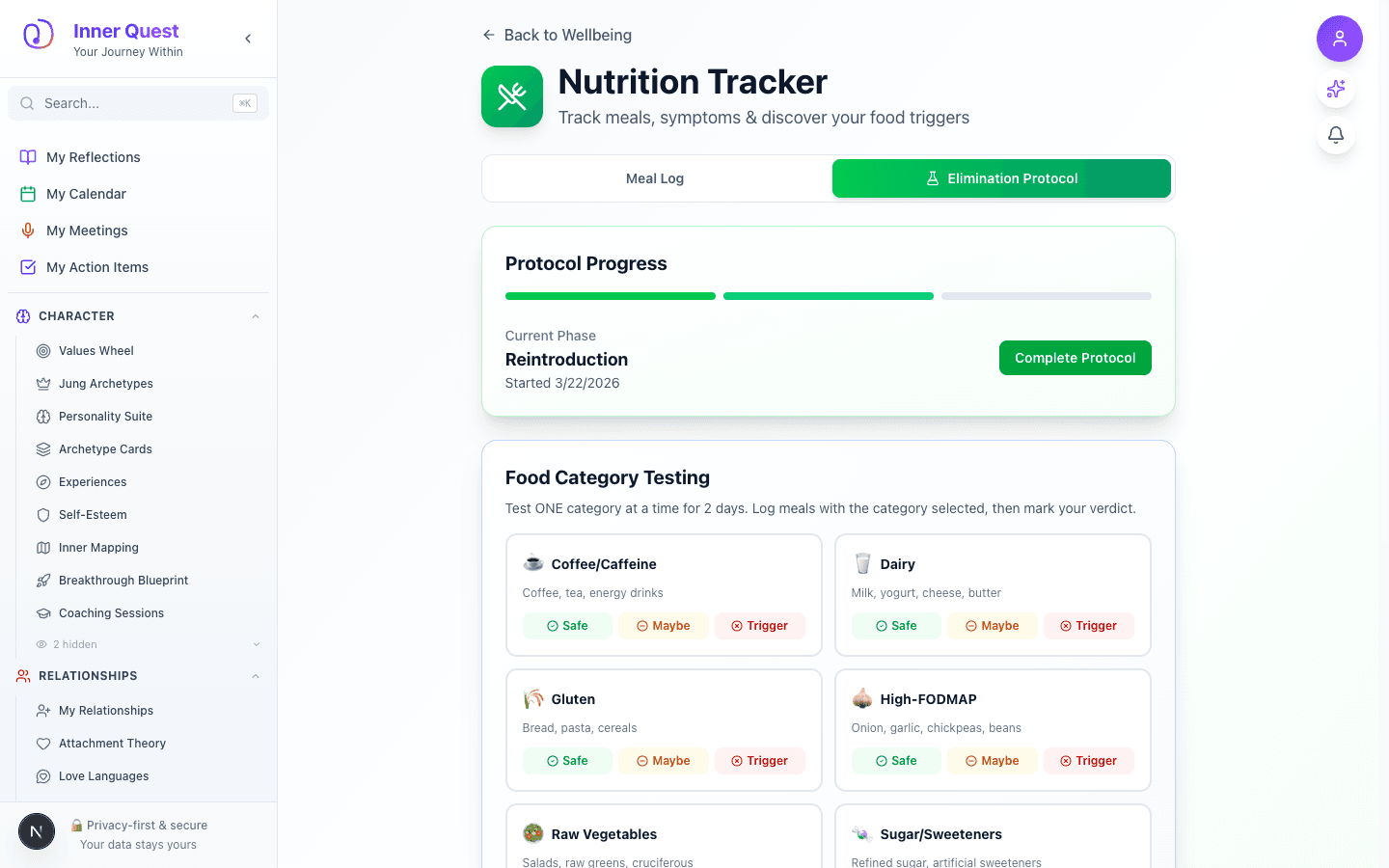
    Reintroduction phase with 12 food category cards and verdict buttons
  9. 09

    Food Verdicts In Action

    Advanced to the next state preserved by the app-owned walkthrough.

    After testing foods, verdicts are visually marked on each card: Coffee/Caffeine marked 'safe' with green border and highlighted Safe button, Dairy marked 'trigger' with red border and highlighted Trigger button, Gluten marked 'moderate' with yellow border and highlighted Maybe button. This creates a visual food map at a glance.

    /nutrition-tracker
    /nutrition-tracker
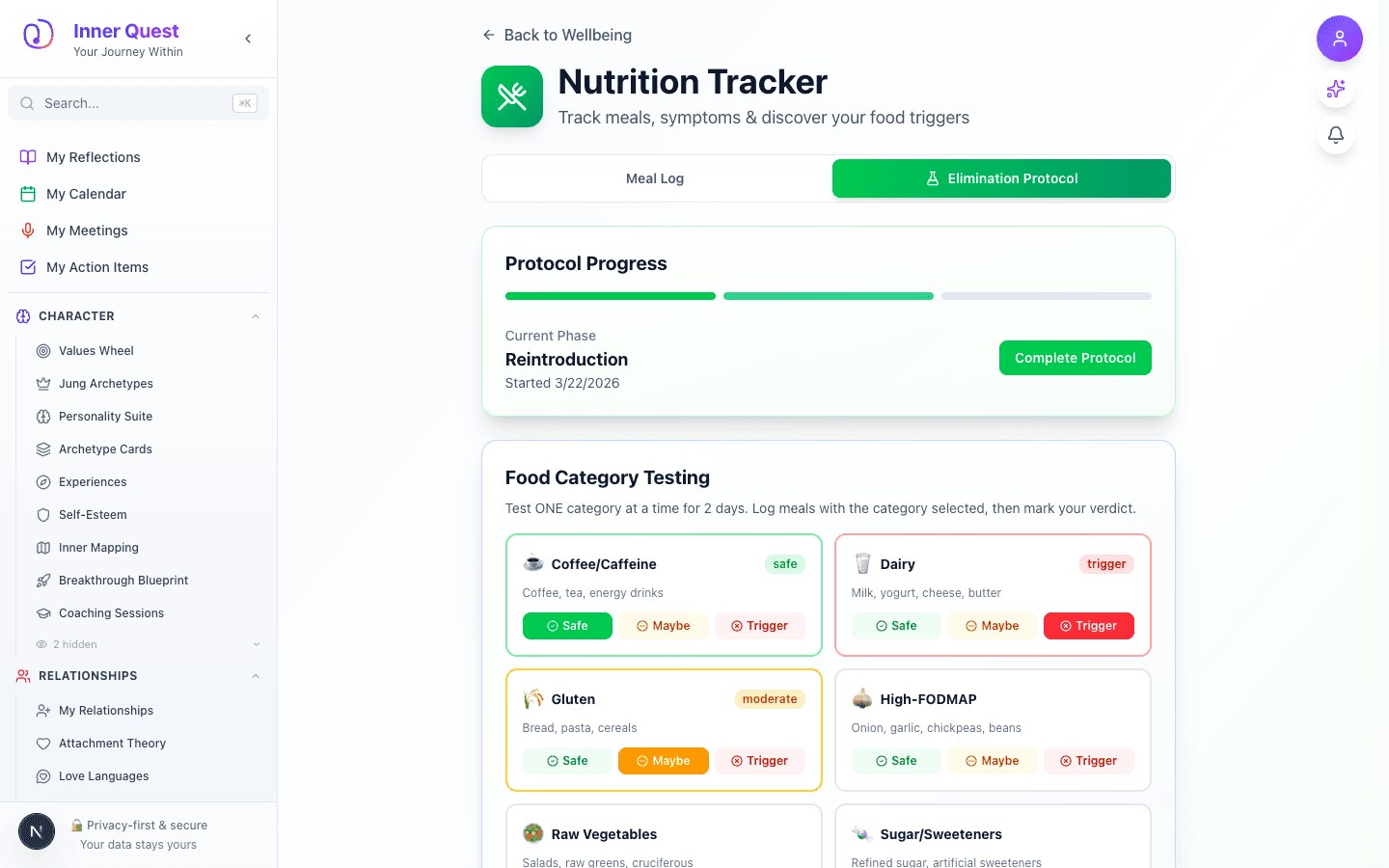
    Food category cards with color-coded verdicts: safe (green), trigger (red), moderate (yellow)

What this feature does

  • Meal logging with full symptom tracking (bloating, gas, discomfort, energy on 0-10 scales)
  • Fasting window tracking to support intermittent fasting patterns
  • Symptom onset timing to help diagnose food sensitivity vs other causes
  • Weekly stats dashboard with averages, symptom bars, and AI-generated insights
  • 3-phase Elimination Protocol: Reset → Reintroduction → Maintenance
  • 12 food category cards covering common sensitivity triggers (FODMAP, dairy, gluten, etc.)
  • Color-coded verdict system: Safe (green), Maybe (yellow), Trigger (red)
  • Personalized food map showing confirmed triggers and safe foods

Worth knowing

  • Log meals consistently for at least a week to get meaningful pattern detection
  • Use the fasting hours field to track intermittent fasting windows
  • Record symptom onset timing — if symptoms appear 30+ minutes after eating, it may be the food; if immediate, consider other causes
  • During the Reset phase, stick strictly to the safe foods list for 3-5 days to establish a bloat-free baseline
  • Test only ONE food category at a time during Reintroduction for accurate results
  • Mark foods as 'Maybe' if you're unsure — you can always retest them later